Modern M: A Typeface Designed for Clarity Across Workflows
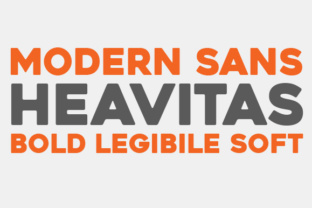
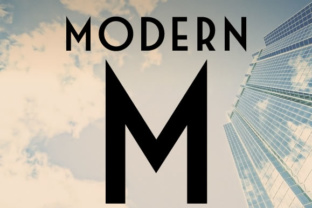
Choosing the right typeface is often an afterthought in project planning, yet it directly affects readability, brand perception, and user trust. Modern M, a clean, squared sans serif font with a distinctly contemporary structure, offers a practical solution for professionals who need consistency across digital interfaces and printed materials. Its geometric clarity and neutral character make it a versatile asset in any workflow that prioritizes legibility without visual noise.
Unlike decorative or overly stylized fonts, Modern M is built for utility. It works as a primary typeface for body text, a dependable option for headings, and a reliable choice for data-heavy layouts. This article explores how Modern M fits into real-world processes, from early planning stages to final production, and offers actionable guidance for integrating it into your own projects.
What Modern M Brings to a Workflow
Modern M belongs to the family of neo-grotesque sans serifs, a category known for clean lines, uniform stroke widths, and minimal contrast. Its squared proportions give it a stable, anchored appearance on screen and on paper. That stability translates into predictable rendering across devices, browsers, and print runs, which reduces the time spent tweaking layouts for different outputs.
In a typical project workflow, typeface selection happens after content strategy but before visual design. Modern M simplifies this transition. Because it lacks strong stylistic flourishes, it adapts to a wide range of tone and context. You can pair it with serif fonts for editorial contrast, or rely on it alone for a unified, modern look. This flexibility means fewer decisions about font pairings, faster prototyping, and more consistency throughout a project.
Where Modern M Excels
The typeface is particularly effective in environments where clarity is paramount. Think dashboards, documentation, slide decks, product interfaces, and long-form reading. Its open apertures and generous x-height improve readability at small sizes, making it suitable for mobile screens and footnotes alike. For professionals who produce both digital and print assets, Modern M reduces the friction of switching between font families optimized for one medium over another.
Creators and marketers will appreciate its neutrality. Modern M does not impose a specific personality on content. Instead, it supports the message by staying out of the way. This makes it a strong candidate for brand guidelines, where consistency across multiple touchpoints matters more than novelty.
Preparing to Use Modern M in Your Projects
Before integrating Modern M into a workflow, consider the licensing model and font file formats you need. Most professional implementations require at least four weights: Regular, Italic, Bold, and Bold Italic. For more complex layouts, consider also Medium and Light weights. Check that the font includes extended Latin characters, numerals, and punctuation, especially if your content includes multiple languages or technical notation.
Digital use typically requires WOFF2 and WOFF formats for web, along with OTF or TTF for desktop applications. Print workflows usually demand OTF with OpenType features such as ligatures, tabular figures, and small caps. Modern M typically supports these features, but verify before committing to a large project.
Preparation also involves testing the typeface across your actual output channels. Load a test page with representative content—headings, paragraphs, lists, tables, and call-to-action buttons—and examine readability at various breakpoints. Print a sample page at actual size to check ink spread and legibility. These steps prevent surprises later and give you confidence that Modern M performs as expected in your specific context.
Using Modern M Before, During, and After a Project
A typeface like Modern M can be introduced at different stages of a workflow, depending on your role and the project’s nature. Here is how it fits into each phase.
Before the Project: Planning and Prototyping
During the planning phase, typeface decisions inform layout grids, typographic hierarchy, and content volume. If you know you will use Modern M early, you can draft wireframes and mockups that align with its proportions. This reduces rework later because the spacing, line height, and overall density are already calibrated to the font.
For example, if you are building a content-heavy website, set up your base typography in Modern M before writing any CSS. Define the body size at 16px or 18px, a line height of 1.5, and a comfortable measure of 60–75 characters per line. These settings will guide your content authors and designers, creating a coherent system from the start.
Entrepreneurs and small business owners can apply the same principle to brand guides. Choose Modern M as your primary typeface during the branding phase, then build all templates—presentations, invoices, social media graphics—around its behavior. This keeps visual output consistent without needing to revisit font choices every time you create a new asset.
During the Project: Implementation and Production
When the project is underway, Modern M serves as a stable element that anchors the visual system. Your team can focus on content structure and layout without worrying about font compatibility or rendering anomalies. This is especially valuable in collaborative workflows where multiple people edit the same documents or codebase.
For a publishing workflow, use Modern M for both body and heading styles. Its squared letterforms create a clean rhythm on the page, making it easy to scan. Apply bold weight for subheadings at 1.25 times the body size, and keep line spacing generous. In a learning or instructional design context, use the regular weight for main content and italic for callouts or examples. The font’s neutrality reduces cognitive load, letting learners focus on the material itself.
In a marketing workflow, Modern M works well for email newsletters, landing pages, and print brochures. Pair it with a single accent color to create visual interest without distracting from the text. Avoid overusing italics or all caps, as the typeface’s strength is its simplicity. Let the spacing and weight hierarchy do the work.
After the Project: Maintenance and Iteration
Once a project is live, Modern M continues to provide value through long-term maintenance. Because it is a neutral, widely compatible font, updating or expanding content rarely requires rethinking the typography. New sections, translated pages, or redesigned components will naturally fit within the existing system.
For quality control, periodically check how Modern M renders across different browsers and devices. Even well-made typefaces can exhibit subtle differences in rendering engines. Create a simple test page and review it quarterly. If you notice any kerning or spacing issues, adjust your CSS or document styles accordingly. This is easier with a consistent typeface than with a patchwork of different fonts.
Bloggers, freelancers, and educators can apply this approach on a smaller scale. When you add new content to a site or course built with Modern M, the typographic system already exists. You simply write within the established styles, maintaining consistency without extra effort.
Integrating Modern M with Other Tools and Resources
Modern M works well with a variety of design and productivity tools. It imports cleanly into Figma, Sketch, Adobe XD, and InDesign. For web projects, use @font-face to load the font files, and set font-display: swap to avoid invisible text while the font loads. In email clients, include Modern M as a primary stack with a fallback like Arial or Helvetica to ensure readability if the custom font does not render.
When collaborating with other creators, share a standard stylesheet that defines sizes, weights, and spacing for Modern M. This prevents divergent interpretations of the font across team members. For solo practitioners, creating a simple template with your most common document types saves time and ensures every new file starts with the same typographic foundation.
Modern M also interacts well with content management systems. In WordPress, set the typeface in the theme settings or via custom CSS. In Notion or other note-taking tools, you may need to use a custom CSS plugin to apply Modern M, but the effort pays off if you produce a high volume of shared documents. For print-on-demand creators or self-publishers, embedding Modern M in your book or zine template streamlines the layout process for each new edition.
Practical Implementation Tips
Here are a few specific suggestions to get the most out of Modern M in daily work.
- Start with hierarchy. Define a clear scale: body text at 16–18px, small headings at 1.25x, medium headings at 1.5x, and large headings at 2x. Adjust for context, but keep the ratios consistent.
- Use letter-spacing sparingly. Modern M’s squared forms already have a clean appearance. Adding letter-spacing can reduce legibility, especially at smaller sizes. Reserve it for all-caps short labels or navigation items.
- Test contrast. Because the font is neutral, rely on weight and size rather than color variation to create hierarchy. Bold weight stands out naturally without needing a different hue.
- Optimize for print. If you are producing physical materials, set body text at 10–12pt with generous leading. Modern M’s squared shapes hold up well in print, but small sizes require careful line spacing to avoid crowding.
- Create a reusable palette. Pair Modern M with one or two complementary fonts if you need variety. A classic serif like Source Serif or a humanist sans like Open Sans can add contrast. Keep the pairing simple to maintain visual coherence.
Long-Term Considerations for Modern M
Over time, the value of a consistent typeface accumulates. Every document, page, or piece of content that uses Modern M reinforces a unified visual identity. For brands, this builds recognition and trust. For individual creators, it reduces decision fatigue and frees up attention for higher-level work.
Modern M also holds up well under evolving design trends. Its squared, clean aesthetic aligns with contemporary preferences but does not depend on any single trend. As interfaces shift toward minimalism, content-first layouts, or system-based design, a neutral typeface like Modern M remains adaptable. This makes it a sound long-term investment for anyone who produces content regularly.
Compatibility is another long-term factor. Modern M is designed for both digital and print, meaning your library of templates and assets remains usable regardless of the medium. You can reuse a presentation template for a video call, a PDF report, and a printed handout without adjusting the font. That consistency saves time and reinforces your professional credibility.
Final Observations on Process
Typeface selection is ultimately a process decision. Modern M fits into workflows that value clarity, efficiency, and consistency. It is not a font that demands attention; it is a font that enables work. Whether you are planning a brand system, building a course, designing a dashboard, or writing a newsletter, Modern M provides a reliable typographic foundation that supports your content rather than competing with it.
Start by integrating it into a single project—perhaps a presentation or a short publication—and observe how it behaves in your specific context. Once you see how its clean, squared letterforms improve readability and reduce layout friction, you will likely find yourself reaching for it again in future work. The best tools are the ones you stop noticing, and Modern M earns its place by letting your content speak clearly.