Hand Drawn 3D: A Versatile Typeface for Creatives Who Want Impact Without the Guesswork
When you come across a typeface that immediately grabs attention, you know you have found something special. Hand Drawn 3D is one of those finds. Its hand-drawn, dimensional look gives any project a sense of energy, warmth, and craftsmanship that standard digital fonts often lack. Whether you are designing a poster for a music event, crafting a logo for a new brand, or building a bold headline for a social media campaign, this font offers a distinctive personality that flat type simply cannot match.
However, the moment you decide to use a specialty typeface like Hand Drawn 3D, you step into a territory with its own set of considerations. Many people download such a font, apply it quickly, and then wonder why the result feels off or why the file does not render as expected. This article walks through the practical decisions you need to make so that your experience with Hand Drawn 3D produces the striking results you envisioned.
Understanding What Hand Drawn 3D Actually Includes
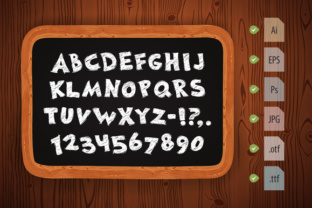
Before you use Hand Drawn 3D in any project, you need to know exactly what you are working with. This set includes two EPS10 and AI vector files containing letters and numbers. You also get two JPG files with clipping paths at 5000×5000 pixels, two PNG transparent files at the same resolution, plus the OTF and TTF font files. That is a solid package for most design needs.
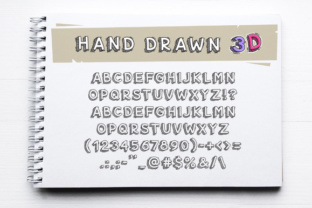
The single most overlooked detail, however, is that this font does not include lowercase symbols. That is not a flaw, but it is a critical constraint. If you paste a sentence typed in normal case, the letters that should be lowercase simply will not appear. Every character will render as its uppercase equivalent. That can throw off readability, especially if you are trying to create a headline that relies on conventional capitalization rules.
Mistake to avoid: Assuming a full character set. Many designers download fonts without scanning the included glyphs. With Hand Drawn 3D, you must plan for all-caps text. If your project requires mixed case for readability or tone, this font will not deliver that nuance.
Better approach: Before you begin any layout, type out your intended text in all caps inside your design software. Read it aloud. Does the rhythm feel right? Does the lack of lowercase change the message’s tone? If it works, proceed. If not, consider using Hand Drawn 3D for short, impactful words where uppercase is natural, such as a brand name, a single-word headline, or a call-to-action button.
The Pitfall of Using Hand Drawn 3D in the Wrong File Format
Hand Drawn 3D comes with vector and raster files, which is a wonderful advantage. But people often grab the first file they see and force it into a workflow where it does not belong. For example, someone might use the JPG file with a clipping path when they actually need a fully editable vector. The result is a static image that cannot be resized cleanly or recolored without losing quality.
Mistake to avoid: Using raster files (JPG or PNG) when your project demands scalability. If you are designing a large banner, a billboard, or anything that will be printed at a large size, the JPG and PNG files, even at 5000×5000 pixels, have limits. Stretch them beyond their native resolution, and you will see pixelation.
Better approach: For print projects that need to be resized frequently, open the EPS10 or AI vector files. These formats let you scale the lettering to any dimension without degradation. Use the PNG or JPG versions only when you need a quick placeholder, a digital-only asset, or a file for a client who cannot open vector software. For logo work, always start with the vector files so you can fine-tune spacing and placement.
Mistaking the Hand-Drawn Look for a Casual Style
Hand Drawn 3D has an organic, textured appearance, but that does not mean it is only suitable for informal or whimsical projects. Some designers limit themselves by assuming that any hand-drawn typeface belongs only on children’s products or crafty branding. That is a missed opportunity.
Mistake to avoid: Underestimating the font’s versatility. The 3D effect and hand-drawn quality can bring warmth to professional contexts as well. A law firm’s website, for instance, probably should not use it. But a boutique coffee roaster, an independent bookstore, a creative agency, or a music festival can use Hand Drawn 3D to stand out with personality while still looking polished.
Better approach: Before you discard Hand Drawn 3D for a project, test it in context. Place the font next to a clean sans-serif body text. Add a subtle background. See how it behaves at different sizes. You might discover that it works beautifully for a refined product label or an upscale event poster when paired with simple, elegant layouts.
Ignoring Readability in Extended Text
Because Hand Drawn 3D has a decorative 3D structure, it is not designed for long reading passages. This is a display typeface. Yet I have seen people try to set entire paragraphs in it, probably because they love the look and want to use it everywhere.
Mistake to avoid: Forcing the font into body text. The 3D shading and hand-drawn irregularities that make the font beautiful at headline size become fatiguing in smaller sizes or long blocks. Readers will struggle to glide through the text, and the message gets lost in the visual noise.
Better approach: Reserve Hand Drawn 3D for short, prominent text. Use it on headings, subheadings, logos, hero sections, and standout phrases. Pair it with a simple, neutral font for the body copy. This contrast not only improves readability but also makes the decorative typeface feel more special when it appears.
The Trap of Ignoring Color and Background
A 3D hand-drawn font interacts with backgrounds differently than flat type does. The dimensional shading already creates depth, so adding a busy or high-contrast background can make the text illegible.
Mistake to avoid: Placing Hand Drawn 3D over a photographic or patterned background without testing contrast first. The shadows and highlights embedded in the font can merge with similar tones in the background, causing letters to disappear or look messy.
Better approach: Use solid, light backgrounds that let the 3D effect remain visible. If you must place the type over an image, add a semi-transparent overlay or a subtle drop shadow to separate the letters from the background. Test your design on screen and in print before finalizing. You can also adjust the color of the font itself, since the vector files give you full control over fills and strokes.
Overlooking Licensing and File Compatibility
Hand Drawn 3D comes with OTF and TTF files, which is standard. But people sometimes skip reading the licensing terms or assume the font can be used in any software without issue.
Mistake to avoid: Installing the font on a system that does not support OpenType features, or using it in software that cannot handle the 3D shading. Also, some designers forget that the font itself is only the typeface, not the 3D effect. If you type with the OTF or TTF file, what you see is a stylized 2D letterform. The full 3D look with dimensional shading comes from the vector files or from applying effects in your design software.
Better approach: Install both the OTF and TTF versions to ensure compatibility across different operating systems. For the true 3D appearance, open the EPS10 or AI files and use those pre-built letter forms. If you prefer to type directly, you can simulate the 3D effect by adding a duplicate layer with offset and color variation, but the vector files already do that work for you.
What to Check Before You Commit
Before you purchase or download Hand Drawn 3D for a client project or a major campaign, verify these details:
- The absence of lowercase letters. Plan your text accordingly.
- The resolution of the raster files. At 5000×5000 pixels, they are suitable for most digital and small-to-medium print uses, but not infinite scaling.
- The vector file formats. If your workflow relies on a specific version of Illustrator or an alternative vector program, test that the EPS10 or AI files open correctly.
- The style of the 3D effect. Look at the sample letters closely. The hand-drawn quality means each letter has slight irregularities. That is part of the charm, but it also means the font will not have the mechanical consistency of a geometric typeface.
Practical Examples of Better Use
Imagine you are designing a poster for a local craft beer festival. You want a headline that reads “BREW FEST 2025.” Using Hand Drawn 3D in all caps from the vector file gives you a rugged, artisanal feel that fits the theme. Pair it with a clean sans-serif below for dates and location. The contrast works.
Now imagine you are creating a logo for a children’s art studio. The same font in a bright color against a white background communicates creativity and fun. Because you have the transparent PNG files, you can place the logo on different background colors without extra work.
In both cases, the key is matching the font’s personality to the project’s purpose. Hand Drawn 3D is not a utility font you use for everything. It is a specialty tool that, when applied with intention, elevates your design.
Final Thoughts on Getting the Most from Hand Drawn 3D
Hand Drawn 3D gives you a head start when you need a dimensional, hand-crafted look. The included vector and raster files mean you do not have to recreate the 3D effect from scratch. But like any design asset, it performs best when you understand its limits. No lowercase letters means you must write with uppercase only. Display nature means you keep it to short, bold statements. Vector availability means you scale it without fear.
When you work within these parameters rather than against them, the font becomes a reliable ally. Your posters, logos, headings, and promotional materials will have a distinctive hand-drawn energy that flat fonts cannot replicate, and you will avoid the frustration of discovering too late that your chosen typeface does not bend to your expectations. Check the files, plan your text, test your backgrounds, and let the natural character of Hand Drawn 3D do the heavy lifting.