Flamingo: A Handcrafted Font with Extensive Glyph Variety
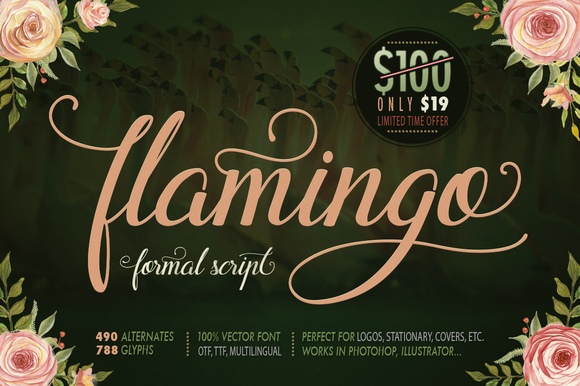
When selecting a typeface for a creative project, the range of available characters often determines how distinctive the final result can be. Flamingo is a handcrafted font that offers over 780 high-quality unique glyphs, with roughly 12 to 20 alternate forms for each letter of the alphabet. This level of variety provides designers, crafters, and hobbyists with considerable flexibility when composing text. Understanding what this font offers, where it excels, and where it may fall short can help you decide whether it aligns with your specific project needs.
What Is Flamingo?
Flamingo is a decorative display font designed with manual craftsmanship in mind. Each glyph has been individually drawn, giving the typeface an organic, non-uniform character that differs from mechanically generated fonts. The font includes uppercase and lowercase letters, numerals, punctuation, and a large set of stylistic alternates. Because each letter has multiple variations, you can mix and match glyphs to avoid repetition and create a more dynamic typographic layout.
The font is fully PUA (Private Use Area) encoded, meaning all alternates and special characters are accessible through standard font selection panels in compatible software. This encoding eliminates the need for specialized scripting or external glyph panels in many applications, though some programs still require a glyph palette to browse and insert alternates manually.
Key Features That Distinguish Flamingo
The primary differentiator of Flamingo is the sheer number of alternate glyphs. With over 780 total characters and roughly 12 to 20 options per letter, you can produce text where no two instances of the same letter look identical. This is especially useful for projects that rely on a hand-lettered or bespoke appearance.
Another notable feature is the handcrafted drawing style. The strokes have subtle irregularities in weight, curve, and spacing that mimic natural handwriting or brush lettering. This gives the font a warm, human feel that contrasts with the precision of many modern typefaces.
Compatibility is broad. Flamingo works in any application that supports installed fonts, including Cricut Design Space, Silhouette Studio, PicMonkey, Adobe Illustrator, Adobe Photoshop, and many others. The PUA encoding ensures that alternates are accessible without workarounds in most of these environments.
Benefits of Using Flamingo
The most immediate benefit is the ability to create text that feels custom and non-repetitive. When you have a dozen or more alternates for the letter "a," for example, you can avoid the mechanical repetition that often gives away a digital font. This is valuable for logos, invitations, quotes, and any design where typography is a focal point.
Another advantage is the time saved. Instead of manually drawing custom letterforms or combining multiple fonts to get variation, you can achieve a handcrafted look from a single typeface installation. This streamlines the design process, especially for projects with tight deadlines or large amounts of text.
The font's handcrafted aesthetic also lends itself well to projects that require a personal, artistic, or rustic tone. Whether you are designing for a wedding, a boutique brand, or a social media graphic, the irregularity of the glyphs can add character that a standard serif or sans-serif font cannot.
Tradeoffs and Considerations
While the large glyph set is a strength, it also introduces complexity. To take full advantage of the alternates, you need to access the glyph panel in your design software. Some applications, such as Cricut Design Space and Silhouette Studio, have limited glyph support or require specific steps to select alternates. If you are working in such an environment, you may need to copy and paste glyphs from a character map or use software like Adobe Illustrator for glyph selection before importing into your crafting program.
The handcrafted nature also means the font may not be suitable for body text or small sizes. The irregular stroke widths and organic shapes can become difficult to read at smaller point sizes or in dense paragraphs. Flamingo is best used for headlines, short phrases, and decorative elements rather than long-form reading.
Another consideration is the stylistic consistency. Because each glyph is hand-drawn, there can be variation in x-height, baseline alignment, and stroke weight across different alternates. This is intentional and part of the charm, but it may pose challenges if you need precise alignment or a uniform appearance across large blocks of text.
Finally, the font's aesthetic is distinctly decorative. It may not suit projects that require a clean, modern, or corporate look. If your brand guidelines call for minimalism or strict readability, a more conventional typeface may be a better choice.
When Flamingo Is a Strong Fit
Flamingo excels in projects where typography is meant to be noticed and appreciated as a design element. Consider it for:
- Invitations and stationery: Wedding invitations, save-the-dates, greeting cards, and thank-you notes benefit from the handcrafted, personal feel.
- Logos and branding: Small businesses, artisans, and creative professionals can use the font to build a brand identity that feels bespoke and approachable.
- Social media graphics: Quotes, announcements, and promotional images gain character from the varied glyph forms.
- Craft projects: Users of Cricut and Silhouette machines can create custom vinyl lettering, labels, and signs with a hand-lettered look.
- Product packaging: Handcrafted or artisanal products can use the font to reinforce the handmade nature of the item.
In these contexts, the font's variability is an asset rather than a complication, and its decorative nature aligns with the overall design intent.
When Alternatives May Be Worth Considering
Despite its strengths, Flamingo is not the right choice for every project. You may want to explore other options if:
- Readability is the top priority: For body text, lengthy paragraphs, or information-heavy layouts, a typeface designed for legibility at small sizes will serve you better.
- You need a clean, modern, or corporate look: Brands that require a polished, uniform, or minimalist appearance will likely find the handcrafted irregularities distracting.
- You are working in software with limited glyph support: If your primary design tool does not offer a glyph panel or easy alternate selection, accessing Flamingo's full potential becomes cumbersome.
- You need precise alignment: Projects that demand exact baseline matching, consistent cap height, or uniform stroke weight across all characters may require a more geometrically precise font.
- You want a free or low-cost option: Flamingo is a premium font, and if your budget is constrained, there are many free decorative fonts that offer a handcrafted look with fewer alternates.
In these scenarios, a simpler, more readable, or more conventional typeface may produce better results with less effort.
Practical Decision-Making Insights
To determine whether Flamingo is right for your project, start by evaluating the role typography plays in your design. If the text is primarily decorative and you want it to stand out, the font's extensive alternates are a clear advantage. If the text carries significant informational weight, you may want to pair Flamingo with a clean, readable body font for longer passages.
Consider your workflow. If you regularly use software with robust glyph panels, such as Adobe Illustrator or Photoshop, you will be able to access alternates efficiently. If you work mainly in Cricut Design Space or Silhouette Studio, test the font in your specific environment before committing to a large project. Some users find that selecting alternates in a separate application and then importing the text is a practical workaround.
Also consider the scale of your project. For a one-off design like a single invitation or logo, the time spent browsing and selecting alternates is minimal. For a large project with many text elements, the manual selection process can become tedious. In those cases, you might choose to use only a subset of alternates or rely on the default forms for some letters.
Finally, evaluate the overall aesthetic fit. Review sample text in your intended layout to see how the handcrafted strokes interact with other design elements. The font's irregularity can complement organic illustrations, floral motifs, and textured backgrounds, but it may clash with geometric shapes, sharp lines, or highly polished graphics.
Evaluating Flamingo Against Your Goals
Flamingo is a specialized tool. Its strength lies in providing a large pool of handcrafted glyphs that allow you to build typography with a unique, non-repetitive character. For projects where this kind of variety adds value, it can be a powerful asset. For projects where simplicity, uniformity, or high readability are required, it may introduce unnecessary complexity.
Before making a final decision, consider testing the font with a short sample of your actual content. See how the alternates work together, how the font behaves in your software, and whether the handcrafted look aligns with your brand or project tone. This hands-on evaluation is often the most reliable way to determine whether Flamingo meets your needs.
Ultimately, the font's value depends on how well its characteristics match the demands of your specific use case. By weighing the benefits of its extensive glyph variety against the practical considerations of glyph access, readability, and aesthetic fit, you can make an informed choice that serves your project effectively.