Amelia Script: A Calligraphy Font Built for Consistency and Variety
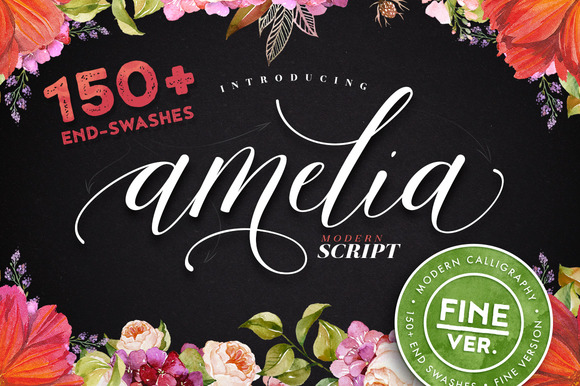
When you work with calligraphy fonts, you quickly encounter a recurring challenge: repeat characters look identical, and the overall composition can feel stiff or mechanical. The natural variation that makes hand lettering appealing is often missing from digital typefaces. That is where Amelia Script enters the conversation. Designed as a calligraphy font with over 150 unique end-swashes, Amelia Script offers something that many alternatives do not: every swash connects seamlessly to every letter, and the font can produce noticeably different results each time you use it. This makes it a practical option for designers, content creators, and small business owners who want a handcrafted look without sacrificing consistency.
This article walks through what makes Amelia Script distinct, how it compares with other calligraphy font categories, where its strengths and tradeoffs lie, and when it may or may not be the best fit for your project. The goal is to help you evaluate whether this typeface aligns with your needs, without overselling or underselling what it can do.
Understanding What Sets Amelia Script Apart
At its core, Amelia Script is a connected script font. That alone is not unusual—many script fonts offer ligatures and contextual alternates. What distinguishes Amelia Script is the scale and intention behind its swash system. With more than 150 unique end-swashes, the font provides a library of flourishes that attach to the terminal of nearly every letter. Each swash is designed to connect perfectly to every letter in the set, so you are not limited to a handful of pre-built combinations.
This design choice solves a practical problem. In many calligraphy fonts, swashes are available only for certain letters or require manual adjustment in vector software. Amelia Script automates the connection, which saves time and reduces friction for users who are not comfortable editing bezier curves. The result is a font that feels more like a modular system than a static typeface.
Another distinguishing feature is the variability. Because the font includes multiple swash options for many letters, you can type the same word multiple times and get different visual outcomes. This is especially useful for branding materials, wedding invitations, social media graphics, and any project where repetition would otherwise expose the limitations of a standard script font.
How Amelia Script Compares with Other Calligraphy Font Options
To evaluate Amelia Script fairly, it helps to place it alongside the broader landscape of calligraphy and script typefaces. Most alternatives fall into one of three categories: standard script fonts, fonts with limited swash sets, and fully custom lettering.
Standard Script Fonts
These are the most common and widely available. They offer a consistent baseline, but they rarely include swashes or contextual alternates. The letters connect smoothly, but the overall look is uniform. If you need a clean, readable script for body text or simple headings, a standard script font may be sufficient. However, if you want decorative flourishes or a hand-lettered feel, you will likely need to add ornaments manually or choose a different font.
Amelia Script sits a step above this category. It provides the same baseline readability while giving you the decorative elements built in. The tradeoff is that Amelia Script has a more ornate default appearance, which may not suit minimal or utilitarian projects.
Fonts with Limited Swash Sets
Many script fonts include a small number of swashes—often five to twenty—that apply only to specific letters like A, E, or R. These can add flair, but they quickly become repetitive in longer texts. You may find yourself using the same swash on the same letter multiple times in a single paragraph, which undermines the handcrafted effect.
Amelia Script's 150+ swashes address this limitation directly. The sheer number of options means you are far less likely to repeat the same flourish in close proximity. This makes it a stronger choice for projects that require extended text, such as quotes, product descriptions, or multi-page documents.
Fully Custom Lettering
Hiring a lettering artist or creating custom script from scratch gives you complete control. Every letter, swash, and connection can be tailored to your exact specifications. The downside is cost and time. Custom work can range from hundreds to thousands of dollars per project, and turnaround times often stretch into weeks.
Amelia Script occupies a middle ground. It cannot match the uniqueness of true custom lettering, but it offers a level of variety that approaches that ideal at a fraction of the cost and time. For small businesses, solopreneurs, and designers working with tight budgets, this tradeoff is often worth making.
Practical Strengths and Realistic Limitations
Every font has strengths and limitations. Understanding where Amelia Script excels—and where it may fall short—will help you decide if it fits your workflow.
Strengths
- Consistent connectivity. Because every swash is designed to connect to every letter, you do not need to test dozens of combinations or adjust spacing manually. This reliability is a significant time saver.
- High variability. With over 150 swashes, you can generate multiple versions of the same text without repeating flourishes. This is ideal for logos, headers, and branding that need to feel fresh across different touchpoints.
- Ease of use. Amelia Script works in standard design software like Adobe Illustrator, Canva, and Affinity Designer. You do not need advanced typography skills to access the swashes—most are accessible through OpenType features like stylistic alternates and swash substitution.
- Versatility across project types. The font works well for wedding invitations, greeting cards, social media posts, website headers, product packaging, and more. Its decorative but still readable structure suits both formal and creative contexts.
Limitations
- Not ideal for body text. The ornate swashes and connected script style can become difficult to read in smaller sizes or dense paragraphs. For long-form content like articles or reports, a simpler serif or sans-serif font is usually a better choice.
- May feel too decorative for some brands. If your brand identity leans toward minimal, modern, or industrial aesthetics, Amelia Script's flourishes may conflict with that direction. It is a font with a strong personality, which is an asset or a constraint depending on your context.
- Learning curve for OpenType features. While the font is easy to use once set up, some users find OpenType menus unintuitive. If you are new to accessing stylistic alternates or swash variants, you may need to watch a tutorial or experiment before you feel comfortable.
- Not a substitute for custom work. No matter how many swashes a font includes, it cannot replicate the bespoke quality of hand-drawn lettering. For high-end branding projects where uniqueness is paramount, custom typography remains the gold standard.
When Amelia Script Is the Right Choice
Amelia Script tends to be a strong fit in scenarios where you need decorative script text that looks intentional without requiring manual intervention. If you are creating a wedding invitation suite and want each guest's name to have a slightly different flourish, the font's variability serves you well. Similarly, if you are designing social media templates for a lifestyle brand and need headers that feel warm and handcrafted, Amelia Script can deliver that tone consistently.
Another natural use case is product packaging. A small batch candle company, for example, could use Amelia Script for product names on labels. Because the font offers multiple swash options, each label variant could look distinct, which adds perceived value and craftsmanship without increasing production costs.
Designers working with tight deadlines also benefit. Instead of manually adding flourishes or switching between multiple fonts, you can type directly and rely on the built-in swash system. This streamlines the workflow and reduces the chances of typographic inconsistencies.
When You Might Consider Another Option
There are also situations where Amelia Script may not be the best fit. If your project requires high legibility at small sizes—such as captions, footnotes, or mobile-friendly text—a simpler script or sans-serif font would serve you better. The same applies to projects with dense text blocks where readability is the top priority.
If your brand identity is minimal or corporate, an ornate calligraphy font may feel out of place. In those contexts, a clean sans-serif with subtle geometric details or a restrained serif would align more closely with the brand voice. Amelia Script makes a statement, and not every project needs that statement.
Additionally, if you are producing a large volume of content where every piece must look identical, the variability of Amelia Script could actually work against you. For example, if you are creating dozens of identical product labels, you may want each one to match exactly. In that case, a standard script font with no alternates would give you the consistency you need.
Decision Factors to Keep in Mind
When evaluating Amelia Script alongside other calligraphy font options, consider the following questions:
- How much text are you setting? For short headings and names, Amelia Script's variability shines. For paragraphs or body text, a simpler font is usually better.
- How important is uniqueness? If you want each use to feel slightly different, the font's swash library is a major advantage. If you need exact repetition, look elsewhere.
- How comfortable are you with OpenType features? The font rewards users who are willing to explore alternates and swash settings. If you prefer a set-it-and-forget-it approach, you may not use the font to its full potential.
- What is your budget? Amelia Script is a one-time purchase that offers extensive versatility. Compared to custom lettering or multiple font licenses, it is cost-effective for most independent creators and small teams.
- What tone are you aiming for? Ornate, elegant, warm, and creative are the natural associations. If your brand or project calls for those qualities, the font aligns well. If you need something more neutral or modern, it may not be the right fit.
Making an Informed Choice
Amelia Script occupies a specific and valuable niche in the world of calligraphy fonts. It offers a practical solution to the problem of repetitive swashes and inconsistent connectivity, while keeping the user experience straightforward enough for designers who are not typography specialists. Its library of over 150 unique end-swashes, each designed to connect perfectly to every letter, gives it a versatility that many alternatives lack.
That said, no single font is right for every project. The key is to match the tool to the task. Amelia Script is an excellent choice when you want decorative script with built-in variety and reliable connectivity. It is less suited to projects that demand minimalism, heavy text, or absolute uniformity. By weighing these factors against your specific needs, you can decide whether this font will elevate your work or whether another option would serve you better.
Ultimately, the best font is the one that helps you communicate your message clearly and consistently. Amelia Script does that well within its intended use cases, and understanding those boundaries will help you use it effectively.