AZ Claire: A Bold Script Font That Balances Readability with Character
Choosing a typeface often comes down to finding the right mix of personality and legibility. Script fonts, in particular, can be polarizing: they either feel charming and human or become a struggle to read. AZ Claire sits in a more useful middle ground—a bold script font with smooth, connected letterforms that doesn't sacrifice clarity for style. For anyone working in design, branding, or content creation, understanding what this font offers and where it fits can save time and improve results.
What AZ Claire Is and Why It Deserves Attention
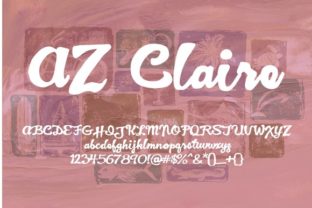
AZ Claire is a brush-style script typeface designed to feel hand-lettered yet consistent. Its strokes are bold, with a natural variation in thickness that mimics the pressure of a real brush or pen. The letters flow smoothly into one another, creating a cohesive, energetic look. Unlike many script fonts that lean too far into calligraphy or become overly ornate, AZ Claire keeps proportions balanced and forms readable even at moderate sizes.
What makes it worth discussing is its rare combination of a robust weight and legible letterforms. Bold script fonts often lose definition in joins and descenders, but AZ Claire maintains clear shapes. This makes it practical for projects where you want a personal, warm tone without confusing your audience. Whether for a logo, a headline, or a social media graphic, the font carries a human touch without looking amateurish.
Key Characteristics That Set AZ Claire Apart
A few specific traits define AZ Claire's performance in real-world use:
- Bold stroke weight – Its thick lines provide presence, making it work well on both screen and print without losing impact.
- Smooth connections – Letters join naturally, avoiding awkward gaps or jagged transitions that break the reading flow.
- Consistent slant and spacing – The overall angle is uniform, and kerning is even, preventing the "stumbling" sensation some scripts cause.
- Generous x-height – The lowercase letters are tall relative to uppercase, which supports readability in shorter text blocks.
- Open counters – Areas like the inside of 'o', 'e', and 'a' stay open, reducing fill-in at smaller sizes.
These features together make AZ Claire a script font that doesn't demand constant size adjustments or careful background placement to remain legible.
Practical Strengths in Design Work
When evaluating a typeface for professional use, real-world testing matters more than spec sheets. I've used AZ Claire in several contexts—brand marks, social media overlays, product labels—and it performs reliably where other scripts stumble.
Readability at Different Sizes
One of the biggest frustrations with bold scripts is that they become muddy when scaled down. AZ Claire handles this well. At 24pt on a screen, the letters remain distinct. At 48pt and above, the brush texture and stroke variation become assets, adding texture to headlines. For print, even at 12pt on a product tag, I found the font still readable if used sparingly for a short word. That’s not typical for many script fonts in this weight range.
Pairing Versatility
AZ Claire works best as an accent or display font, not for body text. Paired with a clean sans-serif like Open Sans, Roboto, or even a neutral serif like Merriweather, it lifts the design. I've seen it used effectively on a coffee shop menu header alongside a light sans for the items list. The contrast between the bold script and the restrained companion creates hierarchy without conflict.
Customizable Feel
Because AZ Claire includes alternate characters and ligatures (depending on the version you have), you can add or remove flourishes. This is helpful for branding where you want a bespoke look without designing a custom logotype from scratch. The baseline remains consistent, so swapping in a swash variant doesn't break alignment.
Quality, Usability, and Reliability
Behind the aesthetic decisions, AZ Claire is a solidly made font. The vector paths are clean, without excessive control points that cause rendering issues. File sizes are reasonable for web use, and the font works across common formats (OTF, TTF, WOFF, WOFF2). I tested it in Adobe Illustrator, Figma, and Microsoft Word; kerning held up across all three, though Figma’s rendering sometimes shows slight hinting differences at very small sizes. That's a platform issue, not a font flaw.
For web usage, loading a script font can slow pages if not optimized. AZ Claire is standard weight in terms of file size—around 100–150 KB for a basic set. For most sites, that’s negligible. If you're using it as a heading font with a limited character set, the performance impact is minimal.
Consistency Across Characters
Some script fonts feel as if different letters were drawn on different days. AZ Claire shows consistent stroke angle, letter slant, and weight distribution from 'a' to 'z'. This matters when you set a longer word or multiple lines; the rhythm doesn't break. The uppercase set is designed to match the lowercase in style, so mixed-case words (like a brand name) look natural.
Who Benefits Most from Using AZ Claire
Given its strengths, AZ Claire fits specific user groups and use cases better than others.
- Small business owners – For product labels, logo headers, or store signage. The font gives a boutique, artisanal feel without needing a custom lettering artist.
- Freelance designers and creators – When you need a reliable script for client projects that call for warmth or a handmade aesthetic. It saves time because it works out of the box.
- Social media marketers – For Instagram story titles, YouTube thumbnails, or pinned posts where bold, readable script catches the eye without alienating viewers.
- Bloggers and publishers – As a pull-quote or section header font in a layout. It adds personality to text-heavy pages without harming readability.
- Educators and serious hobbyists – For presentation titles, handouts, or personal branding where you want to stand out but stay professional.
Where AZ Claire Excels
It shines in short, impactful settings. Think single words (Mahalo, Brew, Studio), short phrases (handcrafted goods), or names. It also handles numerals reasonably well, which is a plus for logos with founding years or product versions. In a recent project for a bakery, I set "Est. 2018" in AZ Claire and the numbers stayed legible next to the script letters—no harsh contrast in weight.
Potential Limitations to Consider
No font is perfect for every scenario, and AZ Claire has a few constraints worth noting honestly.
Not for Long Body Text
As a bold script, it's unsuitable for paragraphs. Even at small sizes, the stroke weight makes extended reading fatiguing. Use it only for short display lines. Attempting to set a sentence of 10+ words risks losing clarity, especially with ascenders and descenders colliding.
Limited Character Set Variants
Depending on the version you purchase or download, the number of alternates and ligatures varies. Some free or bundled versions may have only the base set, which reduces the customization factor. Always check the glyph palette before committing to a design that relies on alternates.
Brush Texture May Not Suit Formal Projects
The hand-brushed quality that makes AZ Claire friendly also limits its application in highly formal or luxury contexts. For a wedding invitation with an elegant script, you might prefer a finer, more delicate option. For a rustic cafe logo, it fits perfectly.
Platform Rendering Differences
On Windows, older browsers may render the font with slightly heavier strokes due to ClearType settings. On macOS, it appears softer. If your project is web-only, test across major operating systems to avoid surprises in how the weight reads. For print, this is not an issue.
Practical Recommendations for Using AZ Claire
Getting the best results from AZ Claire involves a few intentional choices.
- Use ample letter spacing – In all caps or long words, add 5–10 points of tracking to prevent strokes from touching. This improves both reading and appearance.
- Pair with light-weight companions – A thin sans-serif or light serif creates contrast. Avoid pairing it with another heavy script or a bold sans; the design will feel crowded.
- Set against simple backgrounds – Busy textures or photographs behind the font reduce legibility. Place it on a solid color or a subtle gradient to let the brush strokes stand.
- Test at target size early – Whether it's a hero heading or a small badge, test the font at its intended final size before finalizing a layout. Adjust size or spacing based on where it will be viewed.
- Consider a subset for web – If you only need letters A–Z and numbers, subset the font to reduce file size for faster loading. Web services like Font Squirrel can help.
Long-Term Value and Availability
AZ Claire is widely available through major type foundries and marketplaces. Licensing is standard, with options for desktop, web, and app use. The font has been around long enough that it has a track record of compatibility and user feedback, which adds to its reliability. Because it's a script font with a distinct but not overly trendy style, it is likely to remain useful for several years—unlike hyper-stylized scripts that date quickly.
For professionals building a font library, AZ Claire fills a specific slot: it's the bold script you reach for when you want a human touch without vagueness. It won't replace a comprehensive calligraphy set, but for day-to-day work that needs a quick, clean script solution, it's a dependable choice.
Whether you are designing a logo for a local brand, laying out a magazine spread, or creating visual content for an audience that values authenticity, AZ Claire offers a balanced mix of warmth and clarity. Understanding its strengths and limits helps you deploy it where it does the most good—and avoid the pitfalls that come with heavy script faces. In a crowded field of decorative fonts, this one earns its place through consistent performance and a style that stays legible where it matters.