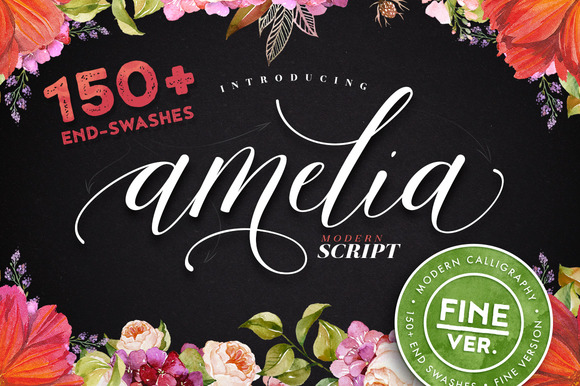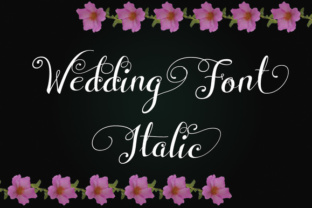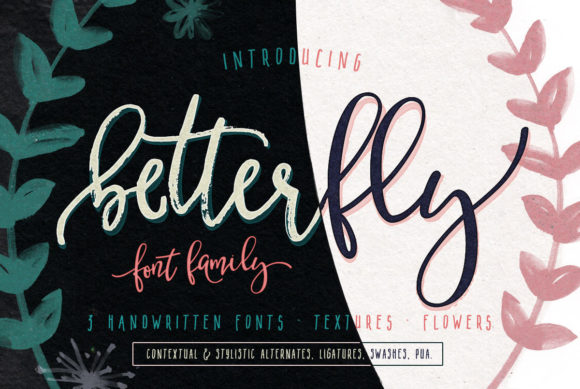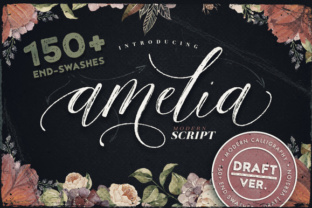
Amelia Script – Draft Version
Whether you’re designing a wedding suite, building a brand identity, or adding a human touch to digital content, the right script font can transform an ordinary layout into something memorable. Amelia Script – Draft Version brings a hand-lettered feel with an expansive set of glyphs and swashes that give you room to experiment without repeating yourself. This isn’t a one-style-fits-all typeface – it’s a versatile tool that adapts to different tones, formats, and audiences.
What Makes Amelia Script – Draft Version Stand Out
At its core, Amelia Script is a modern calligraphic font with a slightly informal, flowing character. The Draft Version retains the organic loops and bouncy baseline of the original while offering a more relaxed, sketched aesthetic. That slight imperfection makes it ideal for projects where you want warmth and authenticity rather than rigid perfection.
What truly sets this font apart is its abundance of extra features. The character set includes multiple alternates for many letters, along with a generous selection of swashes – both initial and terminal. This means you can vary the look of a word or phrase each time you typeset it, avoiding the mechanical repetition that plagues many script fonts. For designers and content creators who value uniqueness, this is a practical advantage.
Creative Possibilities for Designers and Marketers
If you work in branding or marketing, standing out often comes down to small details. Amelia Script – Draft Version can serve as a headline font that feels personal without looking amateurish. Consider using it for:
- Social media graphics: Short quotes, call-to-action overlays, or event announcements gain personality when set in a varied script. Use swashes to frame the text or extend a final letter for extra flair.
- Email headers and landing pages: A script headline can break up the monotony of sans-serif body text. Because the font includes multiple alternates, you can vary your headers across campaigns while maintaining brand consistency.
- Product labels and packaging mockups: For artisan goods, boutique cosmetics, or craft food items, the hand-drawn quality of Amelia Script reinforces the handmade or small-batch message.
For marketers, the key is restraint. Use the swashes and alternates to highlight a single keyword or the brand name, not every word. Pair the script with a clean, neutral sans-serif (like a geometric or humanist typeface) to keep the overall composition balanced.
Applying Swashes and Alternates Effectively
The abundance of glyphs can be overwhelming at first. A practical approach is to start with a standard letterform, then swap in alternates for letters that appear multiple times within a single headline. Most design software allows you to access OpenType features – use stylistic sets, contextual alternates, and swash variants selectively. The goal is variety, not clutter.
For example, if you’re designing a logo for a bakery called “Sweet Crumbs,” you might set “Sweet” with a standard looped ‘s’ and a swashed ‘t’, then use a different ‘e’ alternate to differentiate it from the first occurrence. This keeps the wordmark handcrafted and prevents the same letter from repeating identically.
Practical Inspiration for Small Business Owners and Entrepreneurs
If you run a small business and handle your own materials, Amelia Script – Draft Version can elevate your flyers, menus, or thank-you cards without requiring a professional designer. The font works particularly well for:
- Event invitations and save-the-dates: The draft texture adds a casual elegance that suits garden parties, showers, or anniversary dinners.
- Etsy shop banners and watermarks: A subtle script watermark on product photos conveys craftsmanship. Use a low-opacity swash behind your shop name for a distinctive touch.
- Workshop or course materials: Title pages for PDFs, worksheets, or online course slides appear more approachable with a script heading, which can encourage engagement from participants.
Because the Draft Version carries a slightly roughened edge, it pairs naturally with textured backgrounds – think kraft paper, linen, or subtle grain. For digital use, avoid overly busy backgrounds; a soft solid colour or gentle gradient lets the script stand out.
Adapting Amelia Script for Different Audiences and Formats
Not every project calls for elaborate swashes. The beauty of this font is that it scales in formality depending on how you use its features. For a more reserved tone, stick to the base character set and avoid swashes entirely. The font remains readable and graceful without the extras. For a playful or romantic mood, add swashes to initial capitals or final letters.
Consider the platform:
- Print projects: Because the font has fine details, test it at the intended size. For small text (below 14pt), avoid excessive swashes to maintain legibility.
- Web and mobile: Use Amelia Script for display purposes only – headings above 24px work well. For body text, choose a simpler readable font. The Draft Version’s slight unevenness adds charm but can tire the eye in long paragraphs.
- Large format signage: The script holds up well when scaled up. For a poster or banner, consider adding a subtle outline or shadow to the letterforms to improve contrast from a distance.
Pairing and Hierarchy
A strong layout relies on visual hierarchy. Amelia Script – Draft Version naturally draws attention, so use it as the primary heading or accent. Let a secondary typeface – such as a clean slab serif or a light sans-serif – handle longer subheadings or body text. This contrast prevents the script from overwhelming the page and ensures clarity.
For bloggers and content creators, a script heading can introduce each section of a post, especially on lifestyle, DIY, or food blogs. Pair it with a simple body font like Open Sans or Lato, and keep the color palette neutral to let the typography shine.
Staying Original While Using a Commercial Font
Because many people have access to Amelia Script, you might wonder how to keep your work distinctive. The answer lies in customisation. With OpenType features disabled, the font behaves like a standard script. But when you manually select alternates and swashes, you create a typeset that is effectively unique to your project. No two users will apply the same combinations unless they deliberately copy.
Take notes on which swashes work best for initial letters versus terminal positions. Some letters, like ‘h’ and ‘l’, have particularly graceful exit swashes. Others, like ‘e’ and ‘a’, offer multiple looped variations. By curating a personal library of preferred glyphs, you develop a signature style even within a shared font.
Additionally, consider layering the font with other effects – subtle letter spacing adjustments, colour gradients, or overlapping swashes with transparent shapes. These small interventions push the design beyond the default and make it recognisably yours.
Practical Recommendations for Getting Started
If you’re new to working with rich script fonts, here are actionable steps to make the most of Amelia Script – Draft Version:
- Read the font documentation. Many script fonts include a cheatsheet showing where alternates and swashes are positioned. Familiarise yourself with the glyph map in your design software.
- Set up a test file. Type a few sample words (your name, a brand phrase, a short quote) and cycle through different alternate letters. Save a version with your preferred combinations for quick reuse.
- Use a reference board. Collect examples of script typography you admire – wedding invitations, logo marks, poster art – and note how they handle spacing, swash length, and placement.
- Test legibility on actual devices. Export a high-resolution preview (print or screen) and check that the swashes don’t crowd adjacent letters or elements. Adjust kerning if needed.
- Limit swashes to one or two per word. Overuse can make the text hard to read and visually noisy. A single well-placed swash on the first or last letter is often enough.
With practice, you’ll develop an instinct for when the draft texture adds warmth and when a cleaner script would serve better. Amelia Script – Draft Version gives you the flexibility to explore both directions, making it a reliable addition to any digital toolkit. Whether you’re crafting a brand, planning an event, or simply giving your social media posts a fresh voice, this font invites you to create something that feels both intentional and free.