Haiti Font: A Practical Evaluation for Design Projects
What Is the Haiti Font?
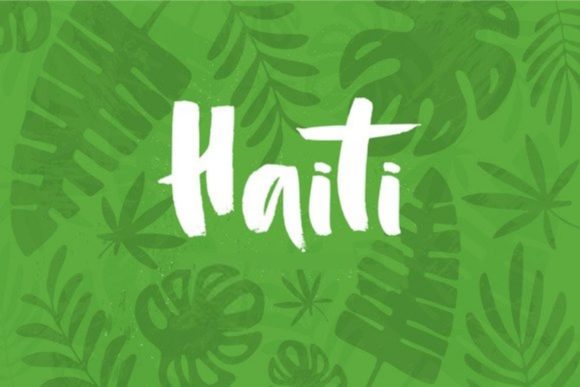
Haiti is a digital brush font that captures the feel of hand-lettering with real brush and ink on paper. Before it was digitized, each character was drawn manually, giving the typeface an organic texture that many casual scripts lack. The result is a relaxed, easy-going style that avoids the sterile precision of purely vector-based fonts. Haiti is best described as a casual brush script—neither too rough nor overly refined—striking a balance between spontaneity and readability.
Unlike fonts that simulate a brush effect through digital filters, Haiti’s organic texture comes from actual ink strokes. This means the letters have natural variations in thickness, subtle ink pooling at stroke ends, and gentle irregularities along edges. These details are preserved in the final font file, so designers can use Haiti without needing to simulate a hand-drawn appearance manually. The font is available in standard formats (OTF, TTF) and includes a basic character set appropriate for many design contexts.
Why Consider Haiti for Your Project?
Designers evaluating brush fonts often look for a typeface that feels authentic without being messy. Haiti appeals because it offers a genuine hand-crafted look while remaining functional for digital use. The key reasons to consider Haiti include:
- Authentic organic texture – Because the original drawings were made with brush and ink, Haiti retains the subtle irregularities that make hand-lettering distinct. This can add warmth and personality to otherwise static designs.
- Easy-going character – The font’s relaxed posture and moderate stroke contrast make it approachable. It does not demand attention but instead supports a friendly, informal tone.
- Versatility in informal contexts – Haiti works well for headlines, posters, social media graphics, packaging, and any project where a human touch is desired.
- Time savings – Instead of hand-lettering each piece of text, you can type directly and still achieve a bespoke, hand-drawn appearance.
Benefits and Tradeoffs of Using Haiti
Like any typeface, Haiti comes with specific strengths and limitations. Understanding these will help you decide whether it is the right tool for your needs.
Benefits
- Genuine hand-drawn feel – The ink-on-paper origins give Haiti a texture that digital-only brush fonts rarely match. This can elevate projects that rely on authenticity, such as artisan branding or café menus.
- Good readability for a script – Many brush scripts sacrifice legibility for flair. Haiti maintains clear letterforms, making it suitable for short to medium-length phrases where readability matters.
- Lighthearted tone – The easy-going nature of Haiti helps convey approachability, creativity, and a human-centric aesthetic. It pairs well with minimalist layouts or neutral sans serifs.
- Consistent baseline and proportions – Despite being hand-drawn, the digitization process stabilized the font so that letters sit on a consistent baseline. This avoids the chaotic alignment of some rough brush fonts.
Tradeoffs and Considerations
- Limited to informal projects – Haiti’s casual style is not appropriate for formal documents, corporate reports, or high-end luxury branding. Its organic texture can appear out of place in contexts that require strict professionalism.
- Limited character set – Depending on the version, Haiti may not include extended Latin characters, ligatures, or stylistic alternates. If your project requires multilingual support or advanced typographic features, this could be a limiting factor.
- Stroke variation may affect scaling – The brush strokes that give Haiti its texture can become less distinct at very small sizes (below 12pt). For body text or fine print, a simpler sans serif or a more robust script may be preferable.
- Overused aesthetic – Brush scripts have become common in certain niches (e.g., craft branding, wedding invitations). Using Haiti without thoughtful pairing might make a design feel generic rather than unique.
Ideal Use Cases for Haiti
Haiti performs best in projects where a handcrafted, approachable look aligns with the message. Strong fits include:
- Brand identities for small businesses – Bakeries, coffee shops, artisan studios, and creative agencies can use Haiti to signal a personal, human touch.
- Social media content – Quotes, announcements, and promotional graphics on Instagram or Pinterest benefit from the font’s friendly energy.
- Product packaging – Labels for handmade goods, organic products, or specialty foods can leverage Haiti’s organic texture to reinforce authenticity.
- Event materials – Flyers, posters, and save-the-dates for casual or retro-themed events can use Haiti to set an informal, inviting tone.
- Display headlines – When paired with a sturdy sans serif for body copy, Haiti can serve as a standout headline that catches the eye without being aggressive.
When Alternatives May Be Worth Considering
Not every project will benefit from Haiti’s specific characteristics. Here are situations where you might look for alternatives:
- Formal or corporate contexts – If you need a typeface that communicates authority, stability, or tradition (e.g., law firm stationery, medical brochures, financial reports), Haiti’s casual brush style would work against that goal. Consider a classic serif or a neutral sans serif instead.
- Long-form body text – For paragraphs of text, especially at small sizes, Haiti’s stroke variation can reduce legibility. A clean serif or a well-crafted sans serif will be more comfortable to read.
- Very large sizes with high contrast – Some brush fonts are designed with dramatic stroke contrast for impact. Haiti is more moderate; if you need exaggerated brush textures or distressed edges, explore other hand-drawn fonts like Brusher or Rough Script.
- Multilingual or extended character needs – If your design includes accented characters, Cyrillic, or Greek, verify that the version of Haiti you choose covers those glyphs. Many lightweight brush fonts do not, so a more comprehensive typeface might be necessary.
- Minimalist or ultra-modern aesthetics – Haiti’s organic texture introduces a warm, imperfect quality. For designs aiming for pure geometric precision or cold minimalism, a sleek sans serif (e.g., Helvetica, Futura) would be more appropriate.
Practical Decision-Making Insights
When evaluating Haiti for your project, consider the following questions to guide your choice:
- What tone does your project require? – If the answer is “friendly, approachable, or handmade,” Haiti is a strong candidate. If the answer is “professional, authoritative, or luxurious,” look elsewhere.
- What is the reading distance and size? – Haiti works best at medium to large display sizes. For body copy or mobile screens, test it at the intended size to ensure strokes remain clear.
- How will you pair it? – A common approach is to use Haiti for headings and a clean sans serif (like Open Sans or Lato) for body text. Avoid pairing it with another script or decorative font, as that can create visual clutter.
- Is the organic texture adding value? – The ink-on-paper origin should support your content, not distract from it. If the texture seems forced or irrelevant to the brand message, a simpler script might be more effective.
- What alternatives have you compared? – Before committing to Haiti, review similar brush fonts such as Brusher, Playlist Script, or Daydream. Compare their stroke contrast, baseline consistency, and character range to see which best fits your technical requirements.
If your project leans heavily on conveying authenticity and a human touch, Haiti’s genuine hand-drawn texture can be a significant asset. However, if you need a brush font that offers more stylistic flexibility or better performance at small sizes, you may want to supplement Haiti with a secondary typeface or explore alternatives with more complete feature sets.
A Balanced Evaluation of Haiti’s Place in Your Toolbox
Haiti is not a universal solution, but it excels in its niche. The font’s organic texture and easy-going character make it a reliable choice for designers who want to infuse projects with warmth without hand-lettering each element. Its limitations—informal tone, moderate character set, and scaling considerations—are manageable when you understand them upfront.
For designers building a font library, Haiti can serve as a go-to casual brush script for small branding projects, social media, and display work. It pairs well with neutral sans serifs and complements natural or organic design themes. The key is to use Haiti deliberately: when the content calls for approachability and authenticity, it shines. When the context demands formality or precision, it is better to set Haiti aside and choose a more appropriate tool.
By evaluating Haiti against your specific project goals, audience expectations, and technical constraints, you can decide whether this hand-drawn font aligns with your needs. For many informal, personality-driven designs, the answer will be a clear yes.