Choosing a Handwritten Font: A Practical Look at Magnolia and What It Offers
When you are selecting a handwritten font for a project, the options can feel overwhelming. There are script fonts, brush fonts, calligraphic fonts, and countless variations in between. Each one brings a different mood, level of readability, and technical capability. Magnolia is one of those fonts that tends to catch attention quickly, but understanding where it fits best and how it compares with other approaches can help you decide whether it is the right choice for your specific needs.
This article walks through what Magnolia is, how it was developed, what makes it distinct, and where it works well. It also covers tradeoffs and situations where another style might serve you better, so you can make a more informed decision without guessing.
What Magnolia Is and What Makes It Distinct
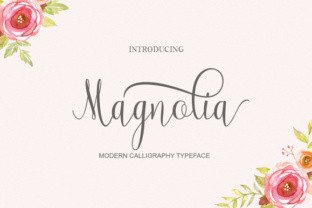
Magnolia is a handwritten font designed with a clear emphasis on elegance. At first glance, you notice the smooth, flowing strokes and the refined proportions of each character. It does not try to mimic casual handwriting or rough brushwork. Instead, it leans into a polished, decorative feel that works well when you want a touch of sophistication without appearing stiff or formal.
One of the most notable aspects of Magnolia is its glyph set. With nearly 350 glyphs, it offers a generous range of characters, ligatures, and alternates. This is not just a bare-bones set of letters and numbers. You get stylistic alternates, swashes, and contextual forms that let you vary the appearance of the text. This matters because handwritten fonts can look repetitive if every instance of a letter is identical. Magnolia reduces that repetition, giving you more natural-looking results across longer pieces of text.
The design process behind Magnolia also contributes to its distinctiveness. According to how the font was developed, every letter was drawn, digitized, optimized, and tested with three core values in mind: elegance, coherence, and uniqueness. That meant multiple rounds of refinement and many do-overs before the final set was released. The result is a font where the letters feel like they belong together as a cohesive set, yet each one has its own subtle personality.
How Magnolia Compares with Other Handwritten Font Styles
When you compare Magnolia with other handwritten fonts, several differences become apparent. Many handwritten fonts fall into one of two broad categories: casual and formal. Casual handwritten fonts often look like quick notes written with a pen or marker. They have uneven baselines, variable stroke thickness, and a relaxed, approachable feel. Formal handwritten fonts, on the other hand, are more deliberate. The strokes are controlled, the spacing is consistent, and the overall impression is refined.
Magnolia sits firmly in the formal category, but it does not go as far as fully ornate calligraphic scripts. It strikes a balance between being decorative and being usable. Compared with fonts that have heavy swashes or extreme flourishes, Magnolia is more restrained. The swashes and alternates are present, but they do not overpower the text. This makes it easier to read in body text or short headings, whereas highly ornate scripts can become illegible at smaller sizes.
Another point of comparison is the glyph variety. Some handwritten fonts offer only basic characters, forcing you to rely on the same letter shapes repeatedly. Magnolia's larger glyph set gives you flexibility. You can choose alternates for certain letters to break up patterns, which is especially helpful when using the font for longer phrases or when you want to emphasize specific words.
Strengths of Magnolia in Practice
One of the main strengths of Magnolia is how well it handles projects that require an elegant, polished look. Wedding invitations are a classic example. The font's flowing lines and balanced proportions complement floral designs, lace textures, and soft color palettes. It also works for baby shower invitations, where you want something that feels celebratory but not overly whimsical.
Business cards and letterhead are another area where Magnolia performs well. If you run a boutique business, a creative agency, or a personal brand focused on style and quality, the font can convey that attention to detail without needing extra ornamentation. It pairs nicely with clean sans-serif fonts for supporting text, which gives you a professional contrast.
Because Magnolia includes multiple alternates and ligatures, you can also use it for personalized items. Monograms, custom stationery, and small-batch printed goods benefit from the variety because each piece can look slightly different even when using the same font. This is a practical advantage that simpler handwritten fonts do not offer.
Tradeoffs and Limitations to Consider
No font is perfect for every situation, and Magnolia has its tradeoffs. One limitation is its suitability for long-form body text. While the font is legible at larger sizes, using it for paragraphs of small text can strain readability. The handwritten style, even when elegant, does not offer the same clarity as a well-designed serif or sans-serif font at small point sizes. If you are designing a document with dense text, Magnolia is better reserved for headings, titles, or short blocks of decorative text.
Another consideration is the formality of the font. Magnolia leans toward a refined, slightly formal look. This makes it less suitable for casual or rugged themes. If you are designing something for a sports event, a tech startup, or a children's product, the font may feel out of place. In those contexts, a more casual handwritten font or a geometric sans-serif would align better with the tone.
File size and rendering can also be a factor, though this is less about the font itself and more about how it is used. Because Magnolia has a large glyph set, it may take slightly longer to load in web applications or PDFs if not subset properly. If you are using it on a website, you should consider subsetting the font to only include the characters you actually need. This keeps page load times fast while still giving you access to the alternates and ligatures.
When Magnolia Is the Right Choice
Magnolia works best when your project calls for elegance, personalization, and a handcrafted feel. Here are some scenarios where it fits naturally:
- Event invitations and stationery: Weddings, baby showers, anniversaries, and galas all benefit from the refined look of Magnolia. The variety of alternates prevents the text from looking repetitive across multiple pieces.
- Branding for lifestyle and luxury businesses: If your brand revolves around beauty, fashion, interior design, or premium services, Magnolia can reinforce that image without needing additional graphic elements.
- Personalized products: Custom mugs, prints, notebooks, and gifts that feature names or short messages look more thoughtful when the font has natural variation.
- Small-scale print projects: Letterhead, business cards, and thank-you notes become more memorable when the typography has character.
In each of these cases, the font's elegance and coherence add value. The time spent on its design shows in the final output, especially when you take advantage of the alternates to tailor the text to your specific project.
When You May Need Another Option
There are also situations where Magnolia may not be the best fit. Understanding these helps you avoid forcing a font into a role it was not designed for.
- Long-form body text: If you are writing a blog, a report, or a book, choose a highly readable serif or sans-serif font for the main text. Magnolia can be used for chapter headings or pull quotes, but not for paragraphs.
- Casual or minimalist designs: Projects that aim for a laid-back, rustic, or ultra-minimal look may clash with Magnolia's refined curves. A simpler handwritten font or a clean sans-serif would feel more intentional.
- Technical or corporate branding: Law firms, engineering companies, and financial institutions typically need fonts that communicate authority and precision. A decorative handwritten font can undermine that message.
- Web use without optimization: If you embed Magnolia on a website without subsetting, you risk slower load times. If you cannot subset the font, consider using it only for static graphics rather than live text.
Decision Factors to Keep in Mind
When you are evaluating Magnolia or any handwritten font for a project, a few decision factors can guide your choice:
- Context and audience: Who will see this, and what impression do you want to leave? Magnolia suits audiences that appreciate detail and tradition. For younger or more experimental audiences, a different style may resonate more.
- Readability requirements: How much text will you set in this font? If it is a short headline or a name, readability is less of a concern. If it is a paragraph, test the font at the intended size before committing.
- Variety needs: Do you need multiple versions of the same letter to avoid repetition? Magnolia's large glyph set is a real advantage here. If you are setting a short phrase, even a simpler handwritten font can work fine.
- Pairing potential: Consider what other fonts will accompany Magnolia. It pairs well with neutral serifs and clean sans-serifs. Test combinations to ensure contrast without conflict.
- Print vs. screen: Magnolia was designed with print and high-resolution screens in mind. On low-resolution displays, fine details may blur. For web use, consider larger sizes and anti-aliasing settings that preserve the stroke shapes.
Practical Examples of Using Magnolia
To give you a clearer picture, here are a few realistic ways Magnolia can be applied:
Example 1: Wedding invitation suite. You design the main invitation with Magnolia for the couple's names and a short phrase like "Together with their families." You pair it with a light serif font for the event details and use one of the swash alternates for the first letter of each line. The result feels cohesive and personal without being overly ornate.
Example 2: Branded stationery for a florist. The business name is set in Magnolia on letterhead and business cards. A subtle floral watermark sits behind the text. The alternates give each business card a slightly different look, which works well for a creative business where no two arrangements are identical.
Example 3: Baby shower banner and thank-you tags. The banner uses Magnolia for the baby's name and a short message like "Welcome, baby." The tags repeat the font with different alternates, so each tag feels unique. The elegance of the font complements pastel colors and soft illustrations.
In each case, the font's strengths are used intentionally, and its limitations are managed by keeping the text short and the size generous.
Final Thoughts on Selecting a Handwritten Font
Choosing a handwritten font is about more than just liking the way it looks on a preview screen. You need to consider how it behaves across different sizes, how much variety it offers, and whether its tone matches your project's purpose. Magnolia brings a level of elegance and glyph variety that sets it apart from many other handwritten options. The careful design process behind it shows in the coherence of the character set and the natural flow of the text.
That said, no single font works for everything. Magnolia excels in decorative, elegant, and personalized contexts, but it is not designed for high-volume body text or casual branding. By understanding its strengths and tradeoffs, you can decide whether it is the right tool for your specific project. And if it is not, you will at least have a clearer idea of what to look for in an alternative.
Ultimately, the best font choice is the one that serves your content and your audience without drawing unnecessary attention to itself. Magnolia does that well when used in the right setting, and knowing those settings is what makes you a more thoughtful designer or decision-maker.